
What's next for #NotesApp
The core loop — publish, book, get paid — is live, and so is a lot around it: the journal feed with your interests, Explore and Saved, Notes Market, free and paid courses, quizzes and certificates in Notes Academy, Your site for Business and Enterprise, the Weekly Digest, Nana AI and the help centre, the MCP server for AI assistants, publishing to LinkedIn and X, messages and free calls, paid sessions, subscriptions, boosts, gifts, the paid plans, organisation accounts, stores with parcel tracking, discount codes and coupons, referrals and the affiliate marketplace, and giving and paid event tickets in communities. Below is what's live in each area and what comes next; the list on the right is decided and documented, not yet built. Last updated 1 November 2026.
Play free · a NotesApp game
Notes Life
Start in a room in Wuse, Abuja with N$ 100,000. Work at Chef Adams, itel Energy or Candellux, learn a tech skill at Digital Witch, pay with a tap of your Paylony CardTap card, survive NEPA's blackouts, own your own Chef Adams or itel outlet, invite your friends and climb the Billionaires List, with your NotesApp account.
Play Notes Life →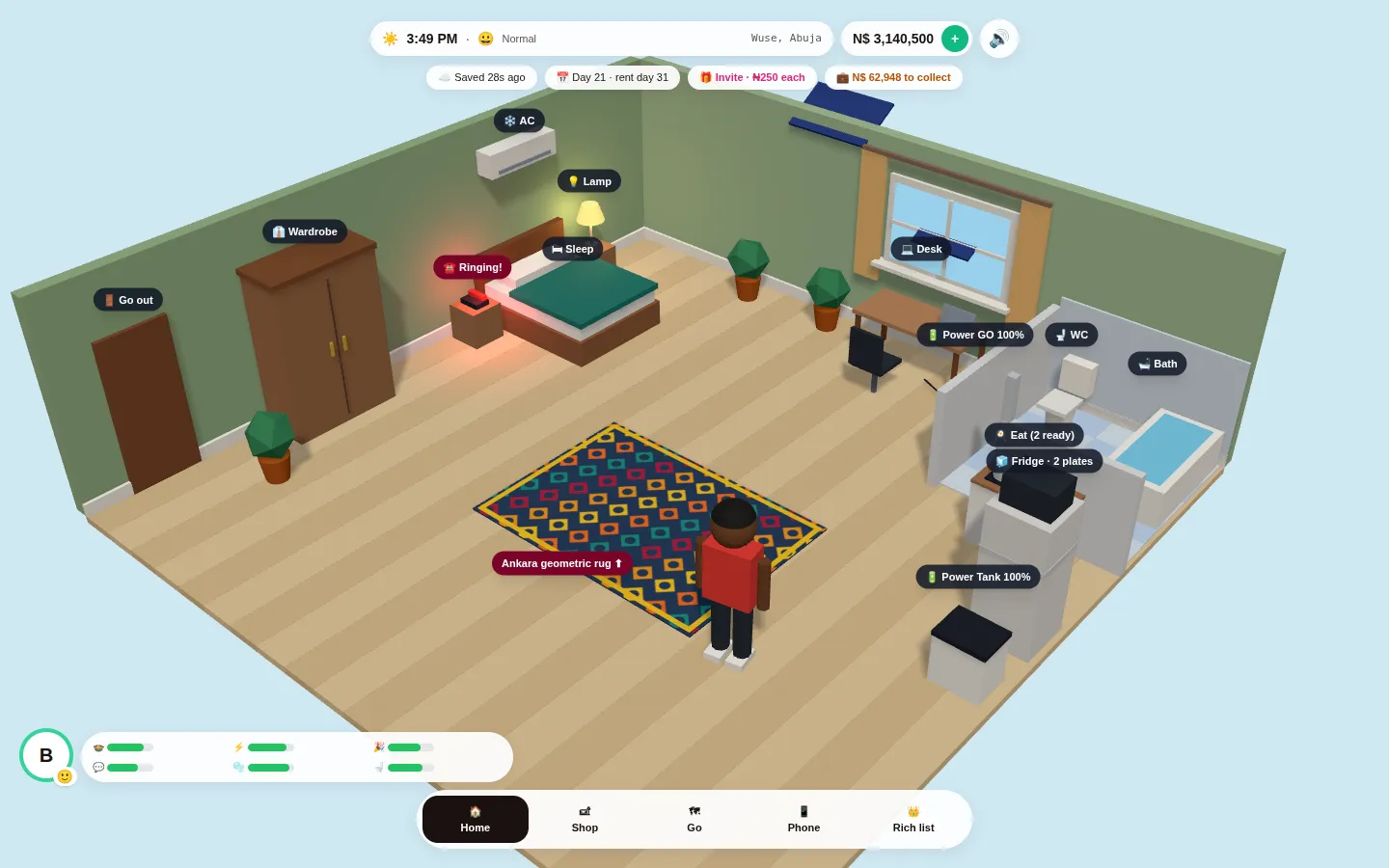
What's actually true right now
✓ Live today
- Journals — real published notes, with a rich-text composer, up to 3 topics each and your own hashtags
- The journal feed: For you (your interests first), Following, Latest and Top · 7d, with Most read and Who to follow; Explore for topics, people and channels, with Market and Academy tabs; and Saved for journals, store items, courses and messages kept from chats
- A new look on phones: one light header, and a tab bar along the bottom (Feed, Explore, Market, Academy, Messages, Profile); profiles with Notes, Store and Courses tabs and Follow, Book a session, Conversation and Gift me
- Notes Market: every #NotesApp store in one place, For you first, then the most viewed and the newest
- Notes Academy: free courses from any publisher, with lessons from their own YouTube that play right here, and paid courses on Pro and above (uploaded videos on Business and Enterprise); quizzes with a pass mark, marked on the spot; co-tutors, organisations, likes, saves and reviews
- Certificates anyone can check by ID or QR code, in the teacher's academy name and logo, to add to LinkedIn or save as a PDF or picture
- Your own site from Free Basic at /s/your-name (your own domain on Business and Enterprise): 16 kits: Personal and creators, Academics and researchers, Fashion, Food & baking, Services, Healthcare, Beauty and wellness (spa, massage, hair or nails), Fitness, Events and photography, Electronics, Motor parts, Solar and energy, Real estate, Schools and Churches/NGOs; a cover photo on every look; a full-photo banner, a services menu with times and prices, a Book your appointment tab and a Night background; the Clean, Luxe (a full-photo opening), Scholar (with dark mode), Legacy, Aurora and Maroon looks; Home leading with your shop, services, courses, notes or a mix with colour sets and a white or paper background (your own brand colour on Pro); Publications (imported from Google Scholar, ORCID or a DOI), Awards, Talks on a globe and In the news; a banner with Book, Shop and Call buttons, hours and contacts, prices, a gallery, testimonials, team and answers, in your order; a storefront for your shop with collection links, search, categories, sorting, an announcement bar and a basket to pay for several items at once; your courses opening inside your site; and About and Contact pages
- The #NotesApp Weekly Digest on Sunday evenings (with the most viewed and most bought in Notes Market and Notes Academy), and a notification when someone @mentions you
- Paid 1:1 sessions on each publisher's own rate and availability, paid through Paystack, with a bookings dashboard, rescheduling and a clear cancellation policy
- Paid monthly journal subscriptions that unlock premium entries
- Post and store-item boosts (pay for validated impressions) and gifts on every profile and post — see Boost and Gifts
- Your own store with physical goods and instant digital downloads and (Pro and above) view-only files and video courses, sold through #NotesApp checkout with parcel tracking — see Store selling
- Shipments for logistics businesses, with a Track page on their own site, and the logistics network: stores choose a delivery partner and buyers pay its price at checkout (Business and Enterprise, or the logistics add-on on Free Basic and Pro)
- Community for churches, NGOs, schools and clubs: Clubhouse-style audio rooms (a host and up to 4 on stage, members listening, raising hands and typing in the room chat), a group-style feed (Write something, Like, Comment, Share), public and members-only Spaces, a General announcement channel, private Circles on Business, admin tools (approvals, join questions, roles, remove and ban, pins, slow mode, insights, View as) and what non-members see, chosen by the admins; and Events for every account with Going and Interested, reminders, repeats and Join live links (free up to 200 members); giving to a community (offerings, tithes and named funds, with charges like a bank transfer and no commission, receipts under My giving, paid to the organisation's bank account) and paid event tickets with a QR code each and check-in at the door (My tickets)
- Inventory: stock per item and option, SKUs and cost prices, low-stock alerts, the history of every change and a spreadsheet in and out (included on Business; an add-on on Free Basic and Pro)
- Free 15-day trials of Pro and Business (each once, with a paid plan between two trials)
- Paid Pro and Business plans through Paystack, and official #NotesApp merch pre-orders in Naira — see Pricing and the Merch store
- Your own domain (Business and Enterprise) and, on Enterprise, the server-to-server API, Console keys and webhooks — see the API Docs
- Video on posts — one MP4 or WebM per post (up to 3 minutes and 100 MB), played in our own data-friendly player, with a weekly allowance by plan
- Moments: a picture, a video or text, with an optional voice-over, on your profile picture for 24, 48 or 72 hours. A video over 90 seconds is split into parts (as many as your plan's weekly video allowance covers); a bar at the top fills in maroon as each moment plays; followers can like, 🔁 re-share or 💬 reply from the Moments row on the Journals page, you can see who watched, you choose whether only your followers or everyone can see yours, and anyone can block or report
- Direct messages with a live inbox: bold, italic and underline, a ✔ when sent and a ✔✔ with the time when read, pictures, videos and documents attached (how big and how many depends on your plan), voice notes of up to 5 minutes and stickers. Pin up to 3 messages in a chat and up to 3 chats in your inbox, see when someone is typing, and edit or delete your own messages (once a message has been read, the reader is asked first). Notifications on your device (offered when you first use Messages, and on until you turn them off), email on Business and Enterprise (off until you switch it on, at most one an hour), and block and report tools
- The NotesApp Credit wallet: top up once (Bonus Credits on ₦5,000 and more) and pay for boosts, badges, adverts, gifts, shop items and sessions without your card each time
- Free voice and video calls in Messages with anyone you follow who follows you back: straight between your two devices, encrypted and never recorded, with a line in the conversation for every call, a notification for a missed one, and Call back on any call line. A safety code proves a call is end-to-end encrypted, and on a computer you can share your screen. Group calls in group chats: up to 6 people talking or 4 on video, phone to phone. In a video call you can move or swap your own picture and switch between front and back camera, and calls ring on the installed app even when it isn't open on your screen
- Nana AI and the help centre: ask anything about #NotesApp, from every page and from a conversation pinned in Messages, and get writing help in drafts, shares and messages; three gems (Pearl, Emerald, Ruby) by plan, a free weekly allowance, Nana credit and an answer bank; topic suggestions from your title, and chat summaries and translations
- The #NotesApp MCP server, phase 1: AI assistants such as Claude and ChatGPT can find creators, journals, store items and courses, and with your API key read your own data (see the API Docs)
- Publishing a post to your connected LinkedIn and X from the post itself
- Download your data or delete your account yourself, under Account → Your data
- Analytics for every member who sells, teaches or publishes: earnings, orders, best sellers, stock running low and visits; customers and a sales download on Pro; visits by page and where visitors came from on Business
- Trending (Notes, Store, Courses and Publishers), a live status page and a public changelog
- Verification badges: the maroon ✔ for accounts in good standing and the gold ✔ for endorsed accounts and identity-checked accounts — see Verification badges
- Publisher payouts to a verified bank account, released automatically after the session
- Email confirmations and reminders · password reset and email verification
- Day, Night or Auto for the whole app (a ☀ / ☽ / ◐ button in the header), the #NotesApp African pattern behind chats and on empty covers, your own chat background on Pro and above, emoji packs (Afro culture, Faces and Flags free; Summer, Spooky and Celebrate with Pro and above), and flags and maps offered as you type a country — see the help article
- Discount codes on every plan for your shop, downloads, courses and sessions, and #NotesApp's own codes for plans (the first payment), boosts, Nana credit, merch and add-ons; coupons in shops and as shareable cards, My coupons, affiliate codes, and Nana applying the best coupon at every checkout — see Discount codes
- Referrals (a friend's first month of a plan free; 20% of their plan payments to you for 12 months) and the affiliate marketplace: promote publishers' products for a share of each sale, taken as cash or as Credit with 10% more
- Comments, likes, shares, follow — all real, all working
○ On the roadmap, not live
- The two Enterprise course packages
- Notes Life: a pixel look, and an HD look with your own avatar and a city map of Abuja with properties
- Our own live streaming for communities
- WhatsApp reminders alongside email and the bell, with SMS when WhatsApp doesn't arrive (a paid add-on for publishers)
- Send-Na by NotesApp: email for developers and businesses, priced in Naira, with WhatsApp and SMS when email is slow (our own email and booking reminders first, then members' own domains, then a public API)
- For logistics providers: API and webhooks on Enterprise, and Nana suggesting delivery rates
- Full white label for Enterprise (sign-in, sign-up and emails in the member's name are live; checkout and bookings on their own site, and their own sending address, are next)
- Domain sales and DNS management through Whogohost (now go54), for Business and Enterprise
- Paylony for real-money payments and payouts, and Tap-to-Pay (CardTap already pays in Notes Life, with game money)
- #1MillionNairaNotesAppChallenge for influencers (coming soon)
- iOS and Android apps (being prepared, with NotesApp Inc)
- Payments across Africa: Paylony for bank transfers and Tap2Pay, Flutterwave for Kenya (M-Pesa) first, then Ghana, mobile money and other currencies; Paystack keeps cards and subscriptions
- Paid add-ons for Business and Enterprise, after our internal testing: the Team hub and team messages, company finance tools (runway, acquisition cost, burn, cap table), the investor and partner data room, and advertising on LinkedIn from #NotesApp
- AI notetaker, and your own AI assistant writing drafts through MCP (reading is live)
- Voice: Listen to a journal, Nana that speaks, voice transcripts
- Publishing to Facebook, Instagram and TikTok
- Google ads on the web and AdMob in the apps
- Nana suggests replies
- Bigger audio and video meetings (more than 6 people), meeting chat (under team discussion)
Notes Academy: courses on #NotesApp
Live now: free and paid courses, quizzes, co-tutors, organisations teaching as themselves, likes, saves and reviews, and certificates. Any publisher can teach free courses, with lessons from their own YouTube that play inside #NotesApp, plus text lessons; on Pro and above, courses can be paid, with PDFs too, and Business and Enterprise upload their own videos. Tutors can add quiz lessons (multiple choice, with a pass mark); a quiz counts as done once the learner passes it. Learners keep their progress, and finishers get a certificate anyone can check and add to LinkedIn. Next: the Enterprise packages.
Free courses are free to publish and to take. Certificates on free courses are paid: the learner pays from ₦999 plus the margin the teacher sets. Paid courses carry text lessons, PDFs and YouTube on Pro, and uploaded videos on Business and Enterprise, kept private and played only for learners who paid, with the viewer's @username and email drawn faintly over the video. Learners keep a paid course on up to 2 devices and can get a refund within 7 days if they haven't started it. Up to 4 co-tutors can teach a course, each paid their share at their own plan's fee, and a paid course can include its certificate in the price. Our fee on paid courses is the same as on digital store items. For organisations, two packages sit on top of Enterprise: Enterprise Courses, and the Enterprise Academy API for a white-label academy of their own. Prices are on the pricing page.
Naija Exam Prep: JAMB, WAEC and NECO practice
Live now at prep.naapp.tech, part of Notes Academy: free practice questions in every subject (7 for JAMB, 18 for WAEC and NECO; a starter bank of 4,090 now going through review, up to 70 a subject for JAMB and 100 for WAEC and NECO) with full explanations, timed mocks marked on the spot, and a pack per exam (every subject, 12 months) that works offline. Students can ask a parent or sponsor to pay with a link, and under-18s use it in teen mode.
Every question is original and checked by a reviewer before it's published; reviewers join by invite link for the subjects they know. Next: access codes and class boards for schools, Nana as a study helper, and more subjects.
Notes Life: a life game on NotesApp
Live now, first playable: a browser game at life.naapp.tech that you play with your NotesApp sign-in. Start in a room in Wuse, Abuja with N$ 100,000, keep your needs up, work general and Chef Adams jobs, take deal calls, eat at Chef Adams, relax at Candellux Imperial, walk Wuse Market (Zone 4) and Aminu Kano Crescent (Wuse II) doing errands for the neighbours, wait at the bus stand for Emerald Ezurukam's convoy, invite friends for Bonus Credits and climb the Billionaires List. Also live: NEPA power cuts with itel Energy's Power GO Pro, Power Tank 1000, solar and generators; a fridge, microwave and food that spoils; jobs at itel Energy and Candellux; owning a Chef Adams or itel outlet (Become a Partner); billboards on the roads; a city picker (Abuja open); the new Candellux with its pool, swimming lessons, pool bar, VIP bar and gym; shawarma, pizza and smoothies at Chef Adams; chatting with friends inside the game for Social; Digital Witch courses, certificates and tech jobs with its founder Cynthia Okeh as #1 on the list; residents (computer players) and seeing real players at the same place; and paying at every counter with a tap of your Paylony CardTap card (game money only). Next: real players working at outlets other players own, Lagos and Port Harcourt, the market street with real NotesApp stores, and calling friends from your game phone.
Your NotesApp profile picture is your portrait in the game. Notesville Naira is game money: earn it from jobs and deals, or buy it with NotesApp Credit (₦1 = N$ 100). It can't be cashed out. Inviting a friend who finishes their first shift gives you both ₦250 in Bonus Credits. Planned later: your own shop stall, events at the Candellux conference hall, and paid calls from NotesApp Credit.
Notes Life: a pixel look and an HD look with a city map
Coming soon. Two looks to choose from, with the same game: a light pixel-art look (characters and places in pixel art, smooth on any computer or phone), and an HD look where you choose your own look in a dressing room, chat beside the scene, work jobs with a timer, and travel on an illustrated Abuja map where you can buy properties with game money.
Today the HD / LOW RES button already makes the game lighter on computers. The pixel look and the HD look come in steps, starting with the room and the Wuse street.
Install NotesApp on your phone or computer
Live now: the app address (app.naapp.tech) has its own welcome screen with sign-in and sign-up built in, and a Download button that says Download on mobile, PC or Mac and opens the steps for your device. Next: working offline for reading, and push notifications on installed apps.
NotesApp installs from your browser: Add to Home Screen on iPhone and Android, Install in Chrome or Edge on a computer, Add to Dock in Safari on a Mac. No store and nothing extra to download. The install page at /install shows the steps for the device and browser you are using.
More networks for social publishing
Live now: connect LinkedIn and X once and publish an excerpt from your own post, with a link back to the full journal on #NotesApp. You see and can change the words first (Nana can write them for you), and nothing goes out until you press Post. Facebook, Instagram and TikTok follow, each on its own rules.
The sharing menu on every post (WhatsApp, X, Facebook, LinkedIn, copy link) works without connecting anything. Connected posting: LinkedIn (a link card with the post's picture) and X (the text and link). Facebook only lets apps post to Pages and reviews every app, Instagram needs a professional account linked to a Page, TikTok is mostly video and keeps posts private until it has audited the app, and WhatsApp has no posting service. LinkedIn connections last about 60 days before you reconnect.
Team hub and team messaging for Business and Enterprise
A shared workspace for your team: a work board with what is moving, stuck or waiting on a decision, milestones, a morning summary and weekly review, and a team room for meetings and chat. Our own team is testing it now (work board with items by department, meetings, a money ledger, payroll, staff roles including legal and engineering, a staff library, team messages, and an Ask Nana panel that knows your open items). It will be offered as a paid add-on for Business and Enterprise once our internal testing is done.
We are running it ourselves before anyone else relies on it, so we can fix what gets in the way. Business and Enterprise accounts will be able to add it for their team seats (four on Business, as many as you need on Enterprise), with the people on your team seeing only what their role needs. It builds on group chats, which are already live. No price or date yet; we will announce both on this page, the pricing page, the changelog and by email.
AI notetaker and your own AI assistant (MCP)
Already here: Nana AI answers questions about #NotesApp and helps with your drafts, posts for LinkedIn and X, and messages (connect your own AI account on the Nana page). New: the #NotesApp MCP server (phase 1, reading only), so AI assistants such as Claude and ChatGPT can find creators, journals, store items and courses, show open session times and share booking links; with your API key they can read your own posts, bookings, orders and earnings (see the docs). Still to come, two AI jobs wired together into one loop: an AI notetaker that follows you into a booked session and writes it up, and your own AI assistant — connected straight to your #NotesApp data — that turns raw material into a finished draft in your voice.
Part 1 — capture: connect a transcription notetaker (Otter.ai, Fireflies, Read AI) to your bookings. Realistically, this means calendar auto-join (the notetaker joins any meeting on your calendar with a video link — no per-meeting invite needed) plus a real Zoom/Google Meet link #NotesApp generates at booking time. Part 2 — draft: connect Claude, Gemini, or ChatGPT to your #NotesApp account via MCP (Model Context Protocol). Drop a raw idea, or hand it that meeting summary, and it reads your own past notes for context — your topics, structure, phrasing — and finishes the draft as if you'd researched and written it yourself, not in generic AI voice. Build order matters: ship the read-only tools (search_my_notes, get_note) well before the write tool (create_draft) — let people trust an AI reading their notes before handing out write access, with token scoping, rate limits, and revocation as day-one requirements for that write tool specifically. This is steps 7–9 of the Value Loop (Capture → Refine → Publish Again), automated end to end: session → transcript → draft, ready to review and publish.
Voice: listen to journals, Nana that speaks, voice transcripts
Planned: a Listen button on every journal that reads it aloud in a natural voice, so readers can listen while commuting or on a low-data connection (and visually impaired readers can follow along). After that, Nana reading her answers aloud, and voice notes and booked sessions turned into searchable text and drafts.
Why: most of our members are on phones with costly data, and many write and read in Nigerian English and Pidgin, so we will test voices and accents with real journals before switching it on for everyone. Listening would be a choice the reader makes, never automatic, and publishers could switch it off for their own posts. Transcripts would build on the voice notes in Messages and on the AI notetaker described above. Narrated lessons for paid courses come later. Not built yet, and no date.
Client-driven session management
Booking, Paystack payment, per-publisher rates, email reminders, client rescheduling (free, up to twice, 24 hours or more ahead), cancellation under a published refund policy, "report a problem" after a session, and automatic payouts 24 hours after a session ends are all live. What's left is WhatsApp reminders.
WhatsApp reminders alongside email and the bell, with SMS when WhatsApp doesn't arrive, for clients and publishers: a paid add-on the publisher switches on (email and bell reminders stay free). They come with Send-Na (below), which builds the WhatsApp and SMS channel once for bookings, events and codes. Everything else in this item is built: see the booking policy on the booking pages and in the Terms.
Send-Na by NotesApp: email, WhatsApp and SMS, priced in Naira
An email service for Nigerian builders and businesses, priced and paid in Naira with no dollar card and no exchange-rate surprises: a ₦15,000 plan stays ₦15,000. Receipts, sign-in codes (and later wallet codes) and newsletters from one dashboard, on separate routes so a newsletter never delays a password reset, and when email is slow or ignored, the message goes by WhatsApp or SMS instead.
First, our own email, sign-in codes and WhatsApp booking reminders move onto it. Then it becomes an add-on on every NotesApp plan: members send receipts, booking messages and newsletters from their own domain, with WhatsApp and SMS for Community and Events reminders, and wallet codes later. After that, a public platform for developers: an API, SDKs for Node.js, Python, PHP and Go, an SMTP relay, test keys that work before your domain is verified, a timeline for every message (queued, delivered, opened, clicked or bounced, with the exact error), the SPF, DKIM and DMARC records written for you, and send tools on our MCP server for AI agents. Planned prices: Free, 3,000 emails a month with no card (and the first 3,000 free on every plan); Pearl ₦1,500, Emerald ₦12,500 and Ruby ₦40,000 a month, the same as an add-on on NotesApp. Prices change at most once a year, with notice.
Gold badge — endorsements and identity checks
The gold ✔ is live: apply on the verification badges page, an admin reviews it, and approved accounts subscribe (₦1,999/month personal, ₦2,999/month organisation, the same on every plan). Identity-checked gold — NIN and live face check for people, CAC for organisations, through Dojah, with a one-off non-refundable deposit — is built too, and its results now reach us automatically.
Identity-check results arrive from Dojah by signed webhook and show next to the application (we store only pass/fail, never ID data); an admin still approves, and applicants get a bell notification and an email when their application is decided. An organisation whose corporate identity check passes is marked registration-confirmed when its gold subscription starts. Coming: approving fully passed checks automatically (built, switched off until we've watched real results).
Full white label for Enterprise
Live today: Enterprise sites run on the member's own domain with the footer “Your name, powered by” and the #NotesApp icon, with sign-in and sign-up in a window in the member's name and logo (it still says plainly that it is a NotesApp account) and password-reset and confirmation emails sent in the member's name. Next, so that nothing visitors touch says #NotesApp: checkout and bookings that open as a popup on their site, and a sending address on their own domain.
Today: Google sign-in isn't offered in the window (someone who signed up with Google chooses “Forgot your password” to set one), and the sender address on those emails is still ours, with the member's name on it. Checkout: Paystack's inline popup instead of a redirect — the popup still shows #NotesApp's name, which we'll confirm with Paystack before promising otherwise. Email: each Enterprise domain becomes a verified sending domain (SPF and DKIM records the member adds), so emails come from, for example, bookings@theirbrand.com. A sweep of error pages and leftover #NotesApp wording follows. The rest of the Enterprise plan is also still to come: unlimited team seats provisioned per account, a dedicated support channel with a service-level agreement, field-team Tap-to-Pay, and syncing sales into accounting tools such as QuickBooks and Xero.
Group calls in group chats
Live now: free calls in a group chat, up to 6 people talking or 4 on video. Everyone in the group is rung with Join, and anyone can tap Join call while it's going; the call goes phone to phone and is end-to-end encrypted, so nobody else, us included, can listen in.
Tap someone's picture in the call to see your safety code with them; if the codes match on both phones, nobody else can listen in. One-to-one calls show the same code, and on a computer you can share your screen. Bigger group meetings, with video for many people, need a different kind of server and come later.
Community and Events
Live: a community for churches, NGOs, schools, clubs and associations, run by the organisation's own admins, like a Facebook group with a channel. Public and members-only Spaces, a General announcement channel where admins post and members react and comment, and private Circles on Business. Events for every account: RSVP (Going or Interested), reminders a day and an hour before, repeating events, and Join live links to YouTube Live, Facebook Live, Zoom or Google Meet. Giving to a community, and paid event tickets with QR check-in at the door.
Free up to 200 members; Business has unlimited members and private Circles. Members and roles (owner, admins, moderators, members), joining open, by approval or by invite link. Members-only posts never appear in Explore, search, link previews, the Weekly Digest, Nana or the MCP server. Giving (charges like a bank transfer, no commission) and paid event tickets with QR check-in are live. Later, in this order: bigger Circles, then our own live streaming as a paid add-on. No date yet.
Online status and followers lists
Live now: see who is online, and when someone was last online, on Messages and on profiles, between people who follow each other. Every profile shows who follows them and who they follow.
It works both ways: if you turn your online visibility off, you stop appearing to others and you can't see anyone else's either. The same goes for the lists: people can open a followers or following list only if they have made their own public, and anyone who hides theirs can't see others'. Both are switches in your privacy settings (Profile, Account) and in your message settings, and both start on. Online status updates about every three minutes.
Nana helps you reply
Planned: Nana suggests a reply to a comment on your post, or a response to a post you are reading, in your own voice. You edit it and press send yourself; nothing is posted for you.
Nana already helps with drafts, posts for LinkedIn and X, and messages. This adds replies, using your own past posts to match how you write. As with the rest of Nana, your text is sent to the AI only when you press the button, and you can connect your own AI account on the Nana page.
More for the team hub: tasks, payments, payroll and a staff library
In internal testing with our own team: payments to be made with who must make them and by when; payroll under Accounts; a message hub; and a staff library for the handbook, SOPs and staff materials, where you upload files and see who has opened and who has confirmed each document (👁). Work items have owners, due dates and reminders, and can be given to departments, such as engineering and product. These come with the Team hub: it will be offered as a paid add-on for Business and Enterprise once our internal testing is done.
Our own team uses it first, as with the rest of the hub. Messages stay in the hub, and the ones marked for email are sent by email too. Policies can ask staff to confirm they have read them. Payroll stays visible only to finance and the owner. The legal team can now be given access and maintains the library with care and product.
Company finance tools: runway, acquisition cost, burn and cap table
For our own team first: a runway calculator that shows how long the cash lasts as you hire, counting the free software plans and credits you have been given; a calculator for what it costs to win a customer and what they pay back; burn and revenue analytics; and a record of who owns what, with vesting schedules.
These sit in the team hub next to the money ledger, and only the owner and senior admins can open the ownership records. The figures can also feed the investor data room. We build the analytics first because the ledger already holds the numbers. We are building and testing them with our own team; once internal testing is done they will be offered as paid add-ons for Business and Enterprise. No price or date yet.
Investor and partner data room
A private data room for investors and partners, with separate logins by category. Files open in a viewer that shows each person's name and email across the pages, and they can't be downloaded. Live traction and revenue figures come straight from the dashboards.
People ask for access with a short form, and the owner approves or adds them. Every opening is logged. A watermark and a signed NDA deter sharing; nobody can stop someone photographing a screen, and we say so. We are building and testing it with our own team first; once internal testing is done it will be offered as a paid add-on for Business and Enterprise. No price or date yet.
Advertise on LinkedIn from #NotesApp
For Business and Enterprise: boost one of your posts on LinkedIn from inside #NotesApp, using your own LinkedIn ad account, and see the campaign's numbers next to your #NotesApp numbers. LinkedIn has approved our access to its Advertising API (development tier), so we are building and testing it internally now. Once internal testing is done (and LinkedIn has reviewed our app), it will be offered as a paid add-on for Business and Enterprise. No price or date yet.
How it would work: you connect your LinkedIn ad account, pick a post, set a budget and audience, and LinkedIn bills you directly; #NotesApp never holds your ad money. Reporting comes back to your dashboard. Later steps, each its own approval and its own privacy review: sending sign-ups back to LinkedIn so campaigns can be measured, and bringing in LinkedIn leads. We would only list audiences you create from your own followers with your consent. It will be a paid add-on for Business and Enterprise, not on Free or Pro. LinkedIn ads cost more per click than most platforms, so it suits members selling to companies and professionals; our own boosts remain the lower-cost way to be seen on #NotesApp.
Domain sales and DNS management
Search, register and manage domains, including .ng and .com.ng, and edit DNS records without leaving #NotesApp, through our domain partner Whogohost (now go54), a gold partnership. For Business and Enterprise, with you as the registrant.
Registration asks for four sets of contact details (registrant, admin, technical and billing). We suggest what we already have, ask before using it, request anything missing, and offer to copy a finished form into the next. Then renew, lock, nameservers, transfer codes and a DNS records editor, and a one-step connection to your #NotesApp site. It starts once Whogohost confirms the search, pricing and DNS calls.
NotesApp Credit and Bonus Credits
Live: a prepaid wallet you top up once and spend across #NotesApp, so you don't have to enter card details every time. Use it for boosts, the verification badge, ad campaigns, gifts, and items and sessions in other members' shops. Notesville Naira in Notes Life can be bought from it too. Next: paid calls.
Top up from ₦1,000 to ₦500,000 through Paystack. Top-ups of ₦5,000 and more add Bonus Credits (₦250 on ₦5,000, ₦700 on ₦10,000, ₦2,000 on ₦20,000, ₦6,000 on ₦50,000 or more), which last 90 days, are spent first, and only on boosts, badges and advert banners (and paid calls, when they come). NotesApp Credit can't be sent to other members and can't be cashed out; sellers and publishers are still paid to their bank accounts, never into a balance. Paying for a shop item or session from the wallet works like paying by card: your money is held until the item is delivered or the session has happened, then the seller is paid, and refunds go back to your wallet. Bonus amounts can change, and are always shown before you pay.
Paylony payments and Tap-to-Pay
Live: top up your NotesApp Credit wallet with Paylony CardTap, a tap of your bank card on an Android phone, at CardTap's own fee (1%, at most ₦1,000), and every counter payment in Notes Life. Next: Paylony as the main payment provider for one-off payments and payouts, with an admin switch to fall back to Paystack. Then Tap-to-Pay: team members' Android phones taking contactless card payments at a pop-up or a customer's door.
Build order: a provider layer that handles every payment and payout through one interface, the admin switch with an automatic fallback, a Paylony webhook, Paylony payouts, then Tap-to-Pay for the team seats on Business and Enterprise, which needs an NFC-capable mobile app.
#1MillionNairaNotesAppChallenge for influencers
Reach 100k views and 10k new followers (people who join #NotesApp through you) to unlock LIVE video, then bring 2,000 registered members into a single live to open a ₦1,000,000 giveaway for that live automatically: ₦250,000 in Bonus Credits for your followers (₦5,000 to ₦25,000 each), ₦250,000 in NotesApp Credit for you, and ₦500,000 you can withdraw straight away, plus a free month of the identity-checked gold ✔ badge for you, and a free month of the maroon ✔ for each follower you pick. Prizes have a 30-day claim window.
Coming soon, together with live video. The first 10 influencers to qualify each month are paid, and each influencer can win once. Full rules, including how views, followers and live audiences are counted and checked, are confirmed before launch.
Payments across Africa
Paystack keeps cards and subscriptions, and stands behind payouts as the backup. Paylony takes bank transfers (your own account number for wallet top-ups and payments) and Tap2Pay. Flutterwave comes as #NotesApp opens in Kenya (from January 2027, with a pilot in December), then Ghana: shilling and cedi prices, M-Pesa and mobile money, and more African currencies after.
No member needs to do anything: plans and saved cards stay as they are. Each country gets prices in its own currency, set by us rather than converted at checkout, and payouts to local banks or mobile money. Dollar payments come with NotesApp Inc, our US company.
Mobile apps — iOS and Android
#NotesApp isn't complete until it runs as a real app on the devices people use: iOS and Android apps for reading, publishing, booking sessions, getting paid, and managing your journal from your phone. Being prepared now: the apps wrap the same #NotesApp you use on the web, so every update reaches them the same day, and they follow NotesApp Inc, our US company, which will hold the App Store and Google Play accounts. Nigeria first, then Kenya and Ghana.
Planned with the apps: push notifications (messages, calls, bookings, reminders, gifts, new posts), the camera and the share sheet, Sign in with Apple, Face ID or fingerprint for the wallet, bookings and shop orders paid through Paystack and Paylony, offline drafts and Exam Prep packs, and — for ads — Google AdMob and other app ad networks, which only run inside mobile apps and sit alongside the NotesApp banners labelled "Sponsored". Tablet and desktop-installable (PWA) versions follow the phone apps.
Trust, safety & account basics
The unglamorous pieces that real money needs: password reset and email verification, a bookings dashboard for both sides, a clear cancellation and refund policy, and terms and privacy consent before payment.
Already in place: reports on moments and conversations reviewed by our team (anything marked nudity or violence within 24 hours), suspensions for a set time that lift on their own, with appeals, rate-limiting on payment and upload endpoints, admin access through Firebase custom claims, automated Firestore security-rules tests, a public status page, a custom media domain, and private storage for paid downloads. Also live: downloading your data or deleting your account yourself, and built-in error monitoring.
Audio and video meetings
Nothing here is built or decided yet — this is what we're weighing. The idea is that a booked session can happen inside #NotesApp. One-to-one voice and video calls in Messages are already live and free.
- Meetings. Audio and video sessions powered by Daily, started from a booking: one link, no separate meeting app. Daily's ready-made call screen already covers the basics below, which we'd confirm before building.
- Transcripts and AI notes. Optional transcription, with an AI note-taker that joins, writes up the session and reports back to the publisher (and, if they choose, the client). This would work alongside the notetaker connections already described above, not replace them.
- Screen sharing and files. Screen sharing for presentations, and sharing files in the meeting.
- Meeting chat. Chat during a meeting, in a group or one-to-one.
Selling physical goods
Live: stores sell through #NotesApp checkout only — buyers pay here, the money is held until they confirm delivery (or 7 days after it's marked delivered), stock is managed (reserved while a buyer pays, sold-out items can't be ordered, “Notify me” alerts land in the bell), every parcel gets a tracking ID with courier details or a bike/bus/park hand-off log, and an organisation's owner can give team members store access (admins can add and edit items without it). Next: courier tracking pulled in automatically.
How selling works →Organisation accounts
Live: organisation sign-up with a CAC registration number, a free 15-day Business trial, an “unverified organisation” notice until we confirm the registration, and the maroon ✔ once confirmed. Team members too: the owner, admins and writers publish under the channel's name (four seats on Business), and everything their posts earn goes to the organisation's single payout account.
How organisation accounts work →Ad-share program
Free journals carry ads with no revenue share; Pro and Business tiers get 25% and 45% respectively, from day one of opting in — no follower or view threshold to clear first. NotesApp banners, ad tracking (unique views and clicks per publisher), monthly ad-share statements with fraud review and a 30-day payout hold, and co-author gift splits are built. Advertisers can already buy banner campaigns online (pay with Paystack, reviewed before they run, refunded if we can't run them or can't deliver every impression); Google ads on the web and AdMob in the mobile apps come next.
Full details, and buy a campaign, on the Advertise page →Something here you'd want early access to? Get in touch.